Banks already record branches, vestibules, and ATM surroundings well. The blind spot is usually the software workflow itself: the teller screen, the service workstation, the maintenance interface, or the back-office application that determined what happened next.
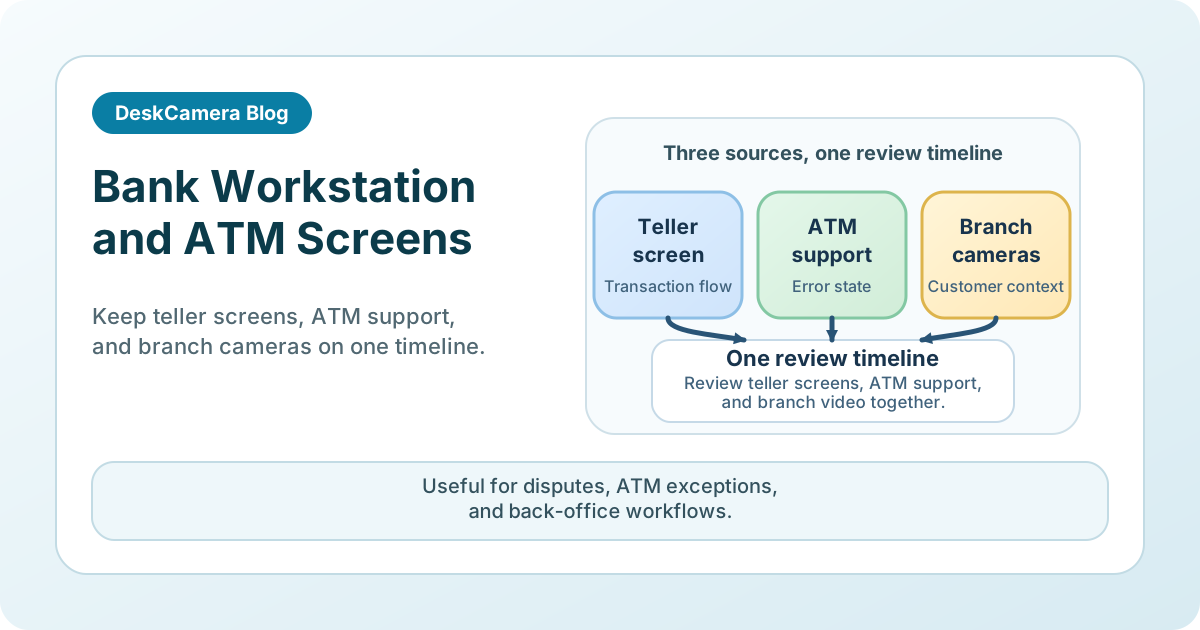
That missing screen context matters in real cases. A room camera can show a customer interaction or an ATM visit, but it cannot show the prompt on screen, the queue the operator was working, or the application state that existed during the disputed transaction.
DeskCamera is relevant in banking because it can expose selected workstation output to the VMS through ONVIF and RTSP-oriented workflows, which keeps screen evidence inside the same review stack already used for branch and ATM video.
Where This Shows Up in Practice
Teams usually start looking at this in three situations:
- a teller dispute where the counter camera cannot show the workflow screen that shaped the transaction
- an ATM exception where the deciding detail was on the ATM-related or support workstation, not in the vestibule video
- a back-office or operations review where investigators need the application state on the same timeline as branch cameras
There is also a related banking use case where the main source is a workstation-adjacent USB webcam that needs to appear as a normal camera feed in an ONVIF-compatible VMS or NVR. That is a different need from teller or ATM screen evidence, so if camera transport is the main requirement, see Use a USB Webcam as an RTSP or ONVIF Camera .
This is a narrower fit than general desktop monitoring. The value comes from preserving screen-visible transaction or service context inside the surveillance review process.
Workflow 1: Teller Dispute Reconstruction
A typical branch use case starts with a dispute at the teller line.
The physical cameras show the customer, the cash area, and the handoff. What they do not show is the application state that drove the interaction. Investigators may need to confirm:
- which account or workflow screen was open
- whether a warning, override, or exception prompt appeared
- what sequence the teller followed before the transaction was completed or stopped
In that scenario, one recorded teller workstation can be reviewed next to the counter camera and branch overview video. That reduces guesswork during dispute handling because the bank no longer has to infer the screen state from operator memory alone.
Workflow 2: ATM Exception and Service Review
ATM incidents are another strong fit, especially when the review involves a withdrawal, deposit, service interruption, or disputed exception.
Cameras around the ATM can show the customer and physical environment, but many cases also depend on what the ATM or support workstation displayed: an out-of-service state, a maintenance prompt, a transaction error, or an exception path seen only by the support role.
Some ATM and terminal deployments also include an embedded or attached webcam on the Windows host. Where that camera is available to the operating system, DeskCamera can expose it as an RTSP source or virtual ONVIF camera for the VMS or NVR, which is useful when the bank wants the terminal-adjacent camera feed handled more like a standard IP video channel.
A narrow deployment can cover:
- the ATM-related workstation used by operations or service staff
- a controlled workstation that supports ATM review and exception handling
- an embedded or attached camera on the ATM or service terminal’s Windows host, where that feed should be recorded like a standard IP video channel
That is especially useful when the question is not only whether a customer was present, but also what the system presented during the event.
In practice, the review is often strongest when that screen context is checked beside the ATM camera views and the bank’s transaction records. Screen recording does not replace those records. It helps explain the prompts, errors, and visible workflow state they may not show on their own.
If you need the implementation model first, see How to Record a Computer Screen to a VMS .
Operational Considerations Before a Rollout
In banking, this is usually both a technical deployment and a governance question.
Sensitive data exposure
Teller and back-office screens may display customer data, balances, case notes, or internal process details. Teams need a defined policy for scope, review permissions, and retention before rollout.
Playback readability
Amounts, prompts, warning messages, and UI state changes have to remain readable during review. That means testing actual playback quality, not only confirming that a stream exists.
Narrow endpoint selection
The right design is usually role-based, not estate-wide. A few high-value workflows create far more review value than trying to record large numbers of general-purpose desktops.
Relationship to journals and systems of record
ATM journals, teller systems, and case records still remain the formal system of record. Screen evidence is most useful when it complements them by showing the visible prompts, warnings, and operator path that structured records may not fully capture.
Evidence handling and retention
Banks already operate under formal review and retention processes. Screen evidence should fit that model rather than creating a side archive that investigators must manage separately.
Why the VMS Model Works for Banking Screen Evidence
In many banking environments, the goal is not to create another archive of desktop videos. It is to keep teller, ATM-support, or back-office screen evidence inside the same surveillance workflow already used for branch and ATM video.
The screen-to-VMS model used in banking follows the same pattern already running in other transaction-heavy environments. A supermarket cashier-system deployment uses DeskCamera to review operator actions, find transaction errors, and build staff training material — the same dispute-and-exception review flow that a teller workstation would need. A compliance-sensitive POS deployment at Victoria Gate Casino moved from a one-till trial to a broader rollout within a week, recording Windows POS tills to a local NVR with no downtime and lower loss incidents.
Banking teams should still validate scope, permissions, and retention for their own workflows, but those deployments confirm the core pattern: workstation transaction screens recorded inside the VMS, reviewed beside area cameras, and retained under one set of rules.
For the broader product picture, review the DeskCamera feature overview and the public compliance statement .
If you want to understand how a Windows workstation can appear in the VMS as a camera source, read Can a PC Act as an ONVIF IP Camera? .
Start with One Controlled Banking Workflow
A strong pilot is usually one teller position involved in frequent disputes, one ATM-support role, or one back-office queue where manual reconstruction is already common. That gives the team a controlled way to validate data exposure, readability, and review workflow before expanding.
If that fits your environment, start a free trial for one teller or ATM-support workstation and test it inside your normal VMS review process.